
How to Set Up a Microscope Workstation for Electronics and PCB Inspection
Oct 22nd 2026
Inspecting printed circuit boards (PCBs) requires precision, especially when working with small electronic components, solder joints, and densely populated circuit boards. Defects that are difficult to identify with the naked eye can become much easier to recognize under a properly configured microscope.
Whether you're a professional electronics manufacturer, quality control technician, engineering student, or electronics repair enthusiast, building a dedicated microscope inspection workstation can improve your ability to examine circuit boards, identify potential defects, and document your findings.
The key is selecting the right microscope, magnification, lighting, and accessories for your specific application.
Why Use a Microscope for PCB Inspection?
Printed circuit boards contain increasingly small components, narrow connections, and closely spaced solder joints. Even experienced technicians can struggle to identify certain defects without magnification.
A microscope allows users to examine details that may otherwise go unnoticed, including:
- Solder bridges connecting adjacent pads or pins
- Cracked or incomplete solder joints
- Misaligned surface-mount components
- Damaged circuit board traces
- Corrosion or contamination around connections
- Lifted pads and damaged components
- Foreign material or manufacturing debris
For manufacturers, microscopic inspection is an important part of quality assurance and troubleshooting. For electronics hobbyists and repair technicians, it can make diagnosing problems and performing precision work considerably easier.
A microscope supports visual inspection, but it does not replace electrical testing, X-ray inspection of hidden connections, or other methods required to confirm certain defects.
What Type of Microscope Is Best for Electronics Inspection?
A stereo zoom microscope is generally the best starting point for PCB inspection and electronics repair.
Unlike traditional compound microscopes, stereo microscopes provide a three-dimensional view of the specimen, making it easier to examine component height, solder joint geometry, and surface irregularities.
They also offer greater working distance, leaving room beneath the objective lens for circuit boards, tweezers, soldering tools, and other equipment.
Important features to consider include:
Adjustable Magnification: A zoom microscope allows technicians to switch between examining larger sections of a PCB and inspecting individual solder joints.
Working Distance: Sufficient space between the microscope and circuit board makes inspection and repair more comfortable.
Adjustable Lighting: Circuit boards contain reflective surfaces that can create glare. Proper illumination makes it easier to distinguish components and inspect solder joints.
Flexible Positioning: Boom stands and articulated arms allow the microscope to move over larger circuit boards without constantly repositioning the sample.
Digital Imaging: A camera can capture images for documentation, training, troubleshooting, and quality-control reports.
Microscope World offers a selection of electronics inspection microscopes designed for these applications.
Project: Build Your Own PCB Inspection Workstation
For this project, we'll walk through creating a dedicated inspection station suitable for examining solder joints, identifying surface defects, and documenting circuit board conditions.
The same basic setup can be used in an electronics manufacturing facility, engineering laboratory, repair workshop, or advanced home electronics workspace.
Step 1: Choose Your Electronics Inspection Microscope
The microscope is the centerpiece of the workstation. Your selection should depend on how frequently you inspect circuit boards, the size of the components, and whether you need digital documentation.
Option 1: Stereo Microscope for Routine Inspection
The Richter Optica Electronics Inspection Microscope 7x–45x is a practical option for inspecting solder joints, examining components, and performing routine electronics work.
It offers:
- 7x–45x zoom magnification
- Adjustable polarized LED ring illumination
- A track stand for stable positioning
- Binocular, trinocular, and digital configurations
This setup is well suited to technicians, engineering students, and advanced electronics hobbyists who need dependable magnification without a large industrial workstation.
Option 2: Boom Microscope for Larger Circuit Boards
For greater flexibility, consider the Fein Optic High Resolution Electronics Inspection Boom Microscope 6.5x–52x .
Its boom stand provides additional positioning flexibility, making it easier to examine different areas of a circuit board.
Key features include:
- 6.5x–52x magnification
- Polarizing LED ring light to help reduce glare
- Adjustable boom stand
- Approximately 118mm working distance in the standard configuration
This microscope is particularly useful for professional inspection stations where operators frequently work with larger circuit boards or need to reposition the microscope.
Option 3: Digital Microscope for Inspection Documentation
For quality-control departments that need to capture and save inspection images, the Fein Optic Digital High Resolution Electronics Inspection Boom Microscope 6.5x–52x offers an integrated digital solution.
This system includes a 10-megapixel camera and software for capturing images and performing measurements on supported systems.
Digital imaging is especially valuable when multiple technicians need to review defects or when inspection findings must be recorded for future reference.
Step 2: Set Up a Stable, Well-Lit Inspection Area
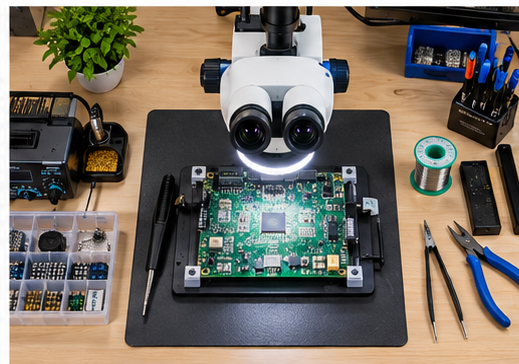
Once you've selected your microscope, prepare a workspace that supports comfortable, repeatable inspections.
Start with a sturdy workbench large enough to accommodate the microscope, circuit boards, inspection tools, and any connected computer or monitor.
Position the microscope so the operator can view the specimen without excessive bending or neck strain.
For professional electronics work, consider an electrostatic discharge (ESD)-controlled workstation with appropriate grounding and handling procedures to protect sensitive components.
Your workspace should include:
- A stable bench or work surface
- Appropriate ESD protection
- Adequate overhead lighting
- A microscope with adjustable illumination
- Circuit board holders or fixtures
- Space for inspection and documentation equipment
If you'll be inspecting larger circuit boards, a boom microscope can provide greater flexibility than a traditional fixed stand.
Step 3: Adjust Magnification for PCB Inspection
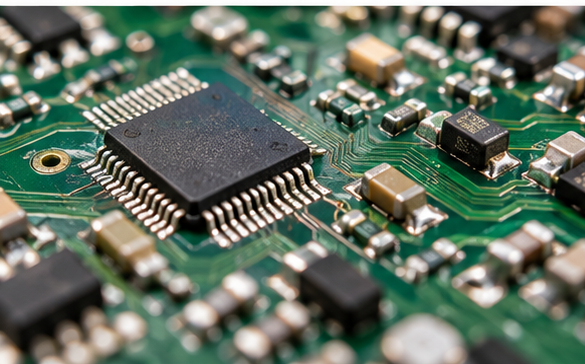
One of the most common misconceptions about electronics inspection is that higher magnification is always better.
In reality, most routine PCB inspection tasks benefit from relatively low to moderate magnification.
Lower magnification provides a wider field of view, making it easier to locate components and inspect larger sections of a board. Higher magnification helps reveal smaller defects but reduces the visible inspection area.
The following ranges are useful starting points:
|
Inspection Task |
Suggested Magnification |
|
General PCB examination |
5x–10x |
|
Component alignment |
10x–20x |
|
Solder joint inspection |
10x–30x |
|
Fine-pitch components |
20x–40x |
|
Detailed surface defects |
30x–50x |
These are approximate starting ranges. The ideal magnification depends on component dimensions, optical resolution, and the inspection task.
For example, when inspecting a circuit board with multiple surface-mount components, begin at a lower magnification to locate the area of interest. Increase magnification when examining individual solder joints or suspicious connections.
A zoom microscope makes this process easier because operators can adjust magnification without switching objectives.
Step 4: Configure Lighting to Reduce Glare
Lighting plays a major role in electronics inspection.
Circuit boards often contain reflective solder joints, metallic connections, and glossy surfaces. Poor illumination can make defects difficult to distinguish.
An adjustable LED ring light provides consistent illumination around the viewing area.
Polarized illumination can help reduce unwanted reflections from shiny electronic components and solder surfaces.
For certain defects, however, angled lighting may be more effective than uniform ring illumination because it creates shadows that reveal surface irregularities.
Consider the following lighting adjustments:
- Use moderate ring illumination for general inspection.
- Adjust polarization to reduce excessive glare.
- Introduce angled lighting when examining raised surfaces or scratches.
- Reduce brightness when reflective components appear washed out.
- Maintain consistent lighting conditions when documenting defects.
Many of Microscope World's electronics inspection microscopes include polarized LED illumination specifically suited to examining reflective electronic components.
Step 5: Secure the Circuit Board for Inspection
Before inspecting a circuit board, make sure it is stable and positioned correctly beneath the microscope.
A PCB holder or fixture helps prevent unwanted movement while allowing the operator to access different components.
For larger boards, the microscope should move over the specimen without requiring constant repositioning.
Always disconnect power and follow appropriate electrical safety procedures before handling or inspecting circuitry. Components such as capacitors may retain hazardous energy even after equipment is unplugged.
Once the board is secured:
- Position the circuit board beneath the microscope.
- Begin at the lowest practical magnification.
- Adjust the focus until the components appear sharp.
- Set the illumination to minimize glare.
- Examine the board systematically, moving from one section to another.
- Increase magnification when a potential defect is identified.
A consistent inspection sequence helps reduce the chance of overlooking problem areas.
Step 6: Inspect Common PCB Defects Under the Microscope
With the workstation configured, you can begin examining the circuit board for potential defects.
Solder Bridges
A solder bridge occurs when excess solder creates an unintended connection between adjacent conductive areas.
Under a microscope, solder bridges may appear as small metallic connections between component pins or solder pads.
These defects are especially important to check on fine-pitch integrated circuits.
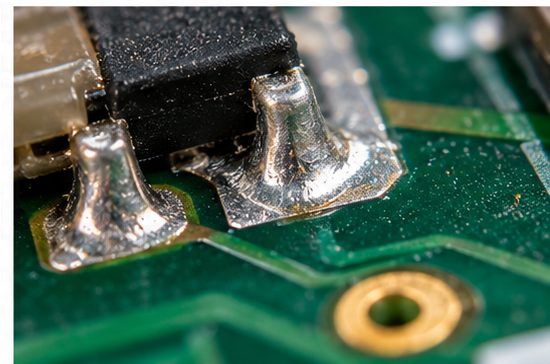
Cracked or Incomplete Solder Joints
Cracks and incomplete solder connections can contribute to intermittent electrical problems.
Under magnification, technicians may observe visible cracks, gaps, or irregular solder joint shapes.
However, not all solder defects are visually detectable. Some require electrical testing or additional inspection methods.
Component Misalignment
Surface-mount components must be positioned correctly relative to their pads.
A stereo microscope can help identify components that appear rotated, shifted, tilted, or improperly seated.
Corrosion and Contamination
Moisture, chemical residue, and environmental exposure can contribute to corrosion or contamination on circuit boards.
Microscopic inspection may reveal discoloration, deposits, or other visible changes around electrical connections.
Damaged Circuit Board Traces
Physical damage, overheating, or improper handling can damage conductive traces and surrounding board materials.
Magnification helps technicians inspect scratches, lifted pads, and visible surface damage.
For production environments, visual findings should be evaluated against the appropriate product-specific acceptance criteria rather than appearance alone.
Step 7: Capture and Document Inspection Images
For professional quality control, identifying a defect is only part of the process. Recording the finding can be equally important.
A digital microscope camera allows operators to capture images of suspected defects and share them with engineers, production teams, or customers.
The Fein Optic Digital High Resolution Electronics Inspection Boom Microscope includes a 10-megapixel camera and imaging software for capturing and saving microscope images.
A basic inspection record might include:
- Circuit board identification or serial number
- Date of inspection
- Component or inspection location
- Type of suspected defect
- Magnification used
- Captured microscope image
- Inspection findings and recommended next steps
For dimensional measurements, the microscope camera and software should be calibrated using an appropriate reference before recording measurements.
Documented images can help teams compare defects, communicate findings, and maintain consistent inspection records.
PCB Inspection Workstation Equipment Checklist
Before beginning your project, use this checklist to make sure your workstation includes the necessary equipment.
|
Equipment |
Purpose |
|
Stereo zoom microscope |
Examine solder joints and electronic components |
|
Boom stand or stable microscope stand |
Position the microscope over the circuit board |
|
Adjustable LED illumination |
Improve visibility and reduce glare |
|
PCB holder or fixture |
Keep circuit boards stable during inspection |
|
ESD-safe work surface and accessories |
Help protect sensitive electronic components |
|
Digital microscope camera |
Capture and document inspection findings |
|
Computer and imaging software |
Store images and prepare reports |
|
Precision tweezers and inspection tools |
Handle small components when appropriate |
Not every workstation requires every item. A hobbyist inspecting small circuit boards may need only a stereo microscope, suitable lighting, and a stable holder.
Professional quality-control departments may benefit from a more advanced digital microscope with image capture and measurement capabilities.
How Much Does a PCB Inspection Microscope Workstation Cost?
The cost of a PCB inspection workstation depends primarily on the microscope, stand, illumination, and digital imaging requirements.
For example, Microscope World offers electronics inspection microscopes ranging from relatively simple stereo configurations to more advanced digital systems.
A non-digital stereo microscope can be a practical starting point for routine visual inspection, while a boom stand and integrated camera generally increase the investment.
Professional systems with specialized imaging and measurement capabilities may cost considerably more.
When comparing equipment, consider the long-term requirements of the workstation rather than choosing a microscope based on magnification alone.
Working distance, optical quality, ergonomics, lighting, and documentation capabilities can all influence how well a microscope performs in daily use.
Explore the available electronics and PCB inspection microscopes to compare configurations for different inspection needs.
Frequently Asked Questions About PCB Inspection Microscopes
What Is the Best Microscope for PCB Inspection?
A stereo zoom microscope is generally the best choice for routine PCB inspection because it provides a three-dimensional view, adjustable magnification, and sufficient working distance for examining components and solder joints. A digital stereo microscope is useful when inspection images need to be documented.
What Magnification Do You Need to Inspect Solder Joints?
Many solder joint inspection tasks can be performed at approximately 10x–30x magnification. Smaller components and fine-pitch connections may benefit from higher magnification, depending on the inspection requirements.
Can You Use a Digital Microscope for Electronics Repair?
Yes. Digital microscopes can be useful for examining circuit boards, documenting defects, and displaying magnified images on a monitor. However, users performing precision repairs should also consider image latency, depth perception, working distance, and ergonomics.
Is a Stereo Microscope Better Than a Compound Microscope for Electronics?
For most PCB inspection and repair applications, a stereo microscope is more suitable. It provides a wider field of view, greater working distance, and three-dimensional viewing. Compound microscopes are better suited to thin specimens requiring higher magnification.
Do You Need a Boom Stand for PCB Inspection?
A boom stand is not required for every application, but it is particularly useful when inspecting larger circuit boards. It allows the microscope to be repositioned over different areas without moving the entire board.
Build the Right Electronics Inspection Workstation With Microscope World
A properly configured microscope workstation can make electronics inspection more precise, efficient, and consistent.
From examining solder joints to documenting manufacturing defects, the right combination of magnification, illumination, positioning, and digital imaging can make a significant difference.
For smaller electronics projects, a traditional stereo zoom microscope may provide everything needed. Larger circuit boards and professional quality-control applications may benefit from boom stands, digital cameras, and advanced inspection systems.
Microscope World offers a range of electronics inspection microscopes and industrial inspection microscopes designed for applications ranging from electronics repair to professional manufacturing quality control.
Explore the available systems to find the right microscope for your inspection project.


